
Jam Track Player Fortnite: Listen Mode Guide
To use the Jam Track Player in Fortnite, open the Emote Wheel during a match, move to Jam Tracks, choose a song you own, and switch to Listen mode. Keep the music playing while you search containers for the weekly quest. You do not need to find a player item on the island.
See the steps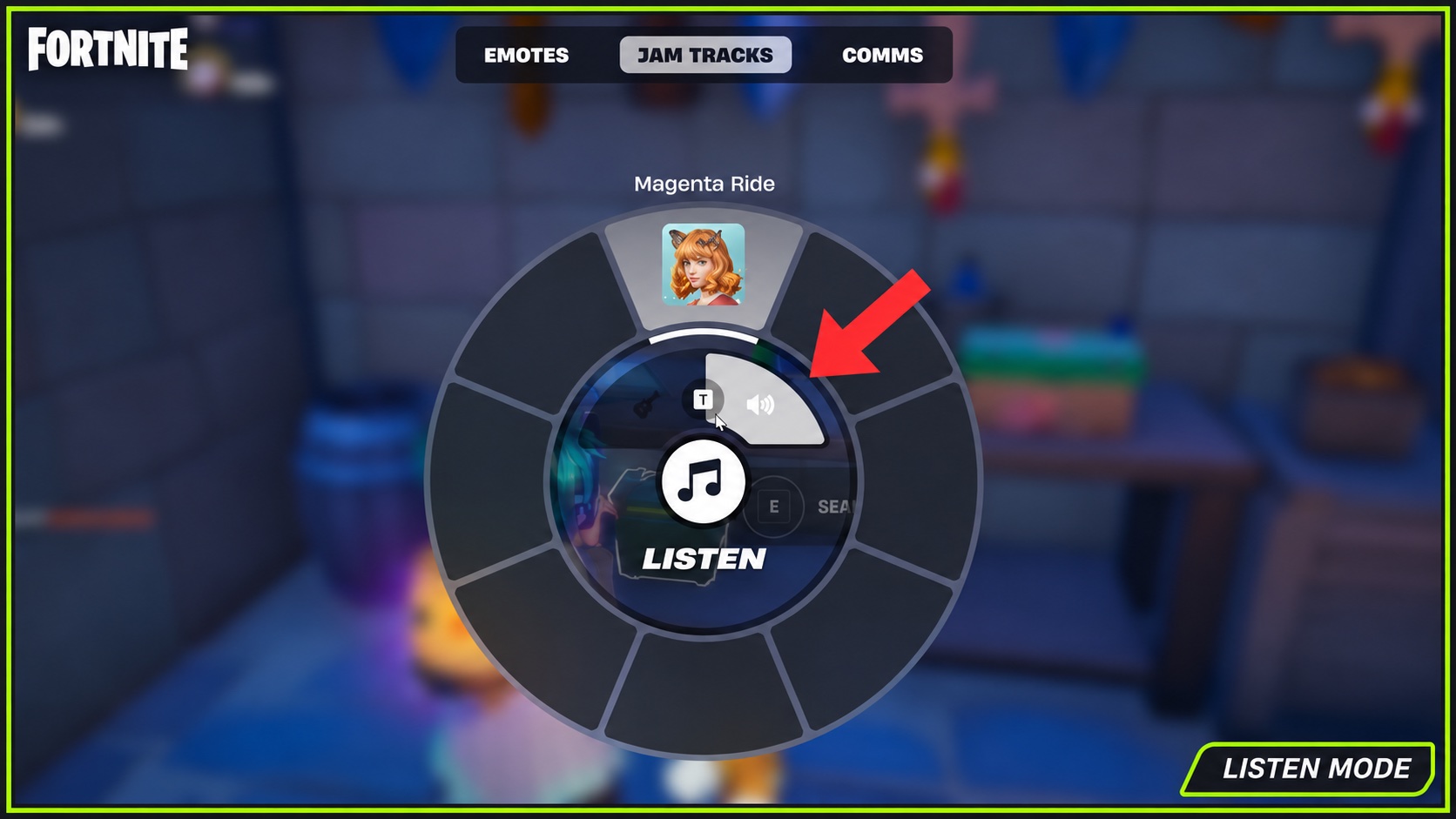
How to use the Jam Track Player in Fortnite
The player is a section of the in-match Emote Wheel. Epic's instructions are to open the wheel, select Jam Tracks, choose a song, and use Listen mode to hear it in the background. The order of the song and mode controls may look slightly different after an update, so follow the labels on your own screen. The important distinction for this quest is that the song is playing in Listen mode when you open each container.
- 01
Enter a match and open the Emote Wheel
Use the Emote Wheel input shown by your current control settings. Keyboard and controller layouts can differ, and a custom bind can replace the default. Look for the wheel itself rather than searching the map for an item called a Jam Track Player. If you are following the container quest, check that it is visible in your in-game quest panel before you spend a match opening boxes.
- 02
Go to the Jam Tracks tab
Move through the wheel tabs until you reach Jam Tracks. Select a song from your collection. Epic describes Jam Tracks as music items you can unlock through a pass or obtain in the rotating Shop, so check what you already own before considering a purchase. Setting music for the lobby or another Locker slot is a separate action; use the in-match wheel for this objective.
- 03
Switch to Listen mode
Choose Listen rather than an instrument part. Listen mode plays the selected track in the background while you continue normal gameplay. Epic specifically warns that some Jam Track Player challenges require listening rather than performing. Before you head to a chest, confirm that Listen is the selected mode and that a track has actually started. If the interface presents these controls in a different order, use both before searching.
- 04
Search containers while it plays
Open searchable containers such as chests, ammo boxes, and produce boxes while the track is active. These are examples reported for the November Treasure Hunters quest; the game's current quest text is the final check. After your first search, open the quest panel and see whether the counter increased. If it did, keep playing and search containers along your usual route. If it did not, stop and check Listen mode before opening more.
Confirm the quest is active, the track is still playing, and the player is set to Listen. Search a fresh container and check the in-game quest panel again. Epic specifically warns that playing an instrument may not meet some challenge requirements.
Listen mode versus playing an instrument
The Jam Tracks tab offers more than one way to use a song. You can perform an instrument part, or you can use the Jam Track Player's Listen mode to hear the track as you move around. Those actions may look similar because both begin in the Emote Wheel, but a challenge that says while listening is asking you to use the background playback option. Epic's own support article cautions that an instrument performance may not satisfy a Listen-mode challenge. If you have been opening containers while a character performs, switch modes before trying the next one.
You do not need to remain in the wheel after starting the song. Listen mode is intended to let music continue during gameplay, so you can move, loot, and travel toward more containers. The reliable check is the quest counter: search one fresh container, then inspect your progress in Fortnite. The page cannot read your Epic account or verify the quest for you, and it should not claim a search counted based only on the picture or a sound cue.
Use the on-screen Listen option with a Jam Track you own. A track playing as an instrument part may not count for a listening objective.
Open one new container, then check the in-game quest panel before following a long looting route.
Jam Track Player Fortnite container quest
Treasure Hunters quest reporting from November 2026 lists a target of 25 containers while listening to the Jam Track Player, with 20,000 XP as the reward. It also reports that progress can carry across matches. These are reports about a particular weekly quest, not permanent rules for every Jam Track Player challenge. Before starting, read the exact objective and count in your current Fortnite quest panel; seasonal wording and rewards can change.
For a practical route, start in an area where you can safely open several containers. Chests, ammo boxes, and produce boxes are reported examples. Search them normally while the music continues. You do not need to travel to a special named location simply to activate the player: the control is in the Emote Wheel, and the containers are the part you need to find in the match. If combat interrupts your route, prioritize staying in the match and resume checking containers when it is safe. This is a search objective, not a requirement to defeat an opponent or buy a specific song.
Try chests, ammo boxes, and produce boxes first. Use your in-game counter to verify which types count in the current quest.
Choose a quieter landing area with several containers. There is no named-location requirement in the reported objective.
The 25-container target, 20,000 XP reward, and across-match progress were reported by Beebom in November 2026. Your in-game quest panel is the current source for your account.
Why are my container searches not counting?
Start with the conditions you can confirm in one match. Check that the quest appears in your active quest list, that you selected a song from the Jam Tracks tab, and that the player is in Listen mode. Search a container that has not already been opened and check the counter immediately. This small test is more useful than opening many more containers without knowing whether the first one counted.
If the counter stays the same, reopen the Emote Wheel and verify the current mode. Epic's support page says some challenges require Listen mode rather than an instrument performance. Also verify the song is still playing and that you are in a playlist where the current quest is available. Epic has announced Jam Track Player support for Battle Royale, Party Royale, and Creative Islands with Jam Tracks enabled, but player availability alone does not prove that a particular weekly quest progresses in every mode. The in-game quest panel remains the best guide for eligibility.
Try another unopened container after correcting the mode, then check progress again. If the objective still does not move, note your mode, track, and the type of container before reporting a possible game issue. These checks help narrow down a mismatch; they are not a guaranteed fix for a Fortnite bug. No website can force quest credit or read the result from your Epic account.
Jam Track Player questions
Where is the Jam Track Player in Fortnite?+
Open the Emote Wheel during a match and move to the Jam Tracks tab. It is a wheel feature, not a device you pick up from the ground. Choose a track you own and use the Listen option to play it in the background.
Do I have to buy a Jam Track?+
You need a track in your collection to select, but that does not mean you must buy a new one for this quest. Epic says Jam Tracks can be unlocked through passes or found in the Shop. Check your existing collection first, then use one you already own if available.
Does playing an instrument count?+
For a challenge that specifically says “listening,” choose Listen mode. Epic warns that some Jam Track Player challenges may not accept instrument performance. If you have been jamming and the counter is not moving, switch to Listen and test one unopened container.
Do all 25 containers have to be in one match?+
Beebom reported that progress on the November 2026 Treasure Hunters quest is cumulative across matches. Check the number displayed in your current quest panel after a match to confirm that progress was saved for your account.
Which containers can I search?+
Chests, ammo boxes, and produce boxes are reported examples. Start with one of these while the track is playing, then confirm the quest counter increases. The current game objective is more reliable than an older guide if the season changes.
Does the player work in Creative Islands?+
Epic says the Jam Track Player can be used on Creative Islands that enable Jam Tracks. That does not establish whether this Battle Royale weekly container quest progresses there. Use the mode eligibility shown in Fortnite before trying to complete a seasonal quest outside its usual playlist.
Why do I not see my song in the wheel?+
First check that the song is a Jam Track in your collection and that you have reached the Jam Tracks tab, rather than another Emote Wheel category. Epic describes Jam Tracks as owned music items. If the interface has changed, rely on the labels shown by the current game version.